Step 01
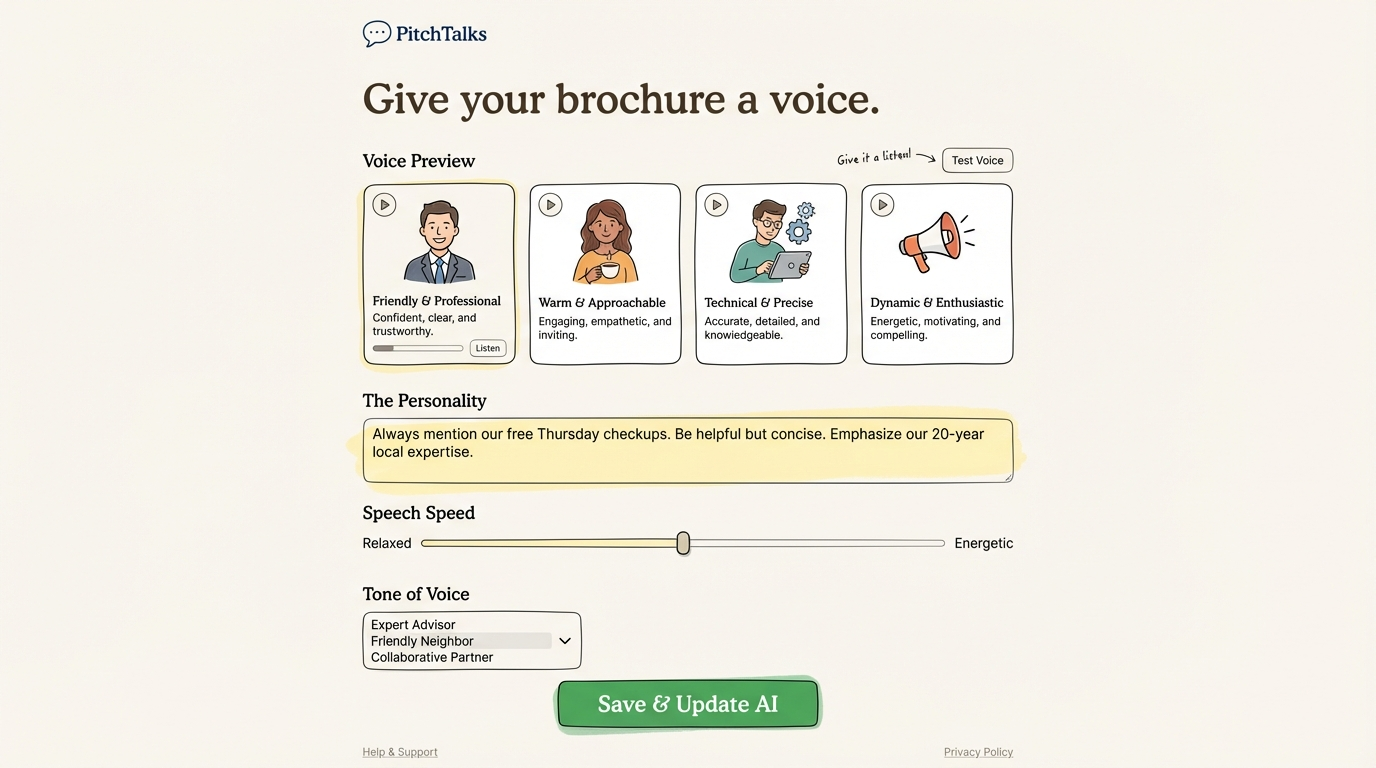
Choose a preview voice
Start with voice previews like friendly, warm, technical, or dynamic so you can hear how your brochure sounds in different styles.
Yes. PitchTalks includes a voice interface powered by AI. Customers can speak their questions naturally, and the AI responds by voice — just like asking a knowledgeable staff member. The voice assistant only answers based on information in your brochure, ensuring accurate and on-brand responses.
Customers can speak naturally to your brochure, and PitchTalks answers back by voice using only the information you approved.
Set the assistant personality, choose a tone of voice, and fine-tune the pacing so the experience matches your brand.
Test different voices and styles before publishing, helping you land on a voice that feels clear, helpful, and trustworthy.
Step 01
Start with voice previews like friendly, warm, technical, or dynamic so you can hear how your brochure sounds in different styles.
Step 02
Add guidance such as brand positioning, offers, and preferred phrasing to shape how the assistant responds.
Step 03
Adjust speech speed and tone of voice, then save the configuration so every conversation feels polished and on-brand.
The voice setup experience lets you audition different presentation styles, add brand guidance, and balance delivery from relaxed to energetic. It is designed to make your AI brochure feel more like a well-briefed team member than a generic assistant.
Included controls
Book a demo and we’ll show you how PitchTalks turns brochure content into a voice experience your customers can actually talk to.